


Curo BabyWatch™
Curo BabyWatch™
Check On Your Baby While You Drive
See your baby without turning around
Know they're okay with a quick glance
Clear view, even at night

Curo BabyWatch™

KEY FEATURES
KEY FEATURES
Seamless Wireless CarPlay
Enjoy CarPlay wirelessly while you drive. Take calls, play music, and navigate without any cables or hassle.
Real-Time Rear View
See your loved ones live on your car’s screen. No recording, no uploading — just instant peace of mind.
Night Vision
Clear visibility of your baby or pets, day and night.
150° Wide-Angle View
See the entire back seat with a wide 150° field of view. Adjust the camera to get the perfect angle for your setup.
Flexible Mounting Options
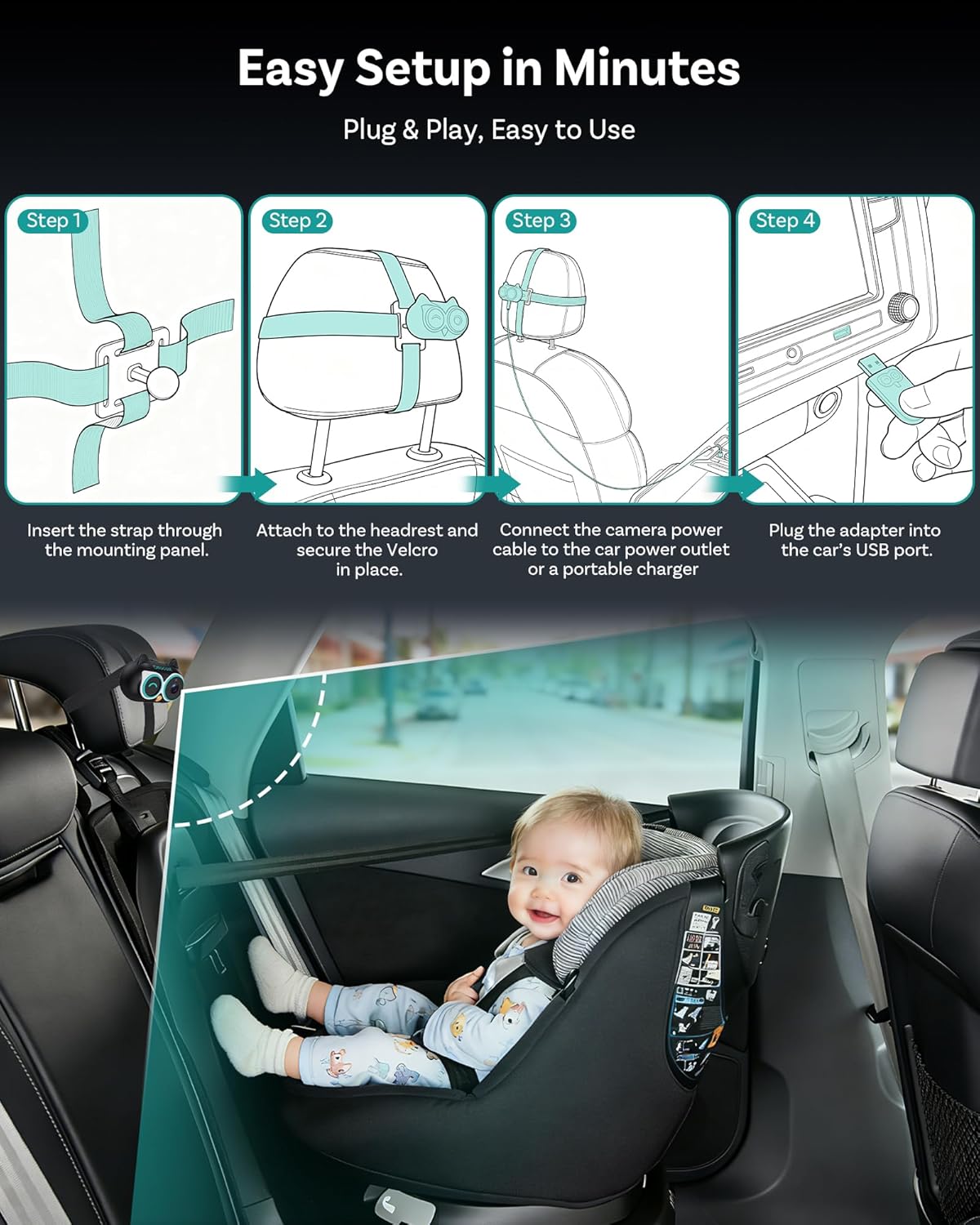
Install the monitor your way — with a secure headrest strap or by clipping it onto the metal rods using the included tools. Quick, stable, and easy to set up.
Always Up to Date
Stay compatible and up to date with over-the-air FOTA updates that fix issues and improve performance on the go.
🚨BEFORE YOU BUY
🚨BEFORE YOU BUY
Requires Factory Wired Apple CarPlay
For 2016 or newer vehiclesRequirements:
- Vehicle: Factory wired Apple CarPlay required.
- Phone: iPhone only.
- Not supported: Android Auto-only or wireless-only CarPlay vehicles.
Camera Mode: Works independently. Just connect power—no phone connection required.
Not Compatible: Sony aftermarket head units.
Mitsubishi Vehicles: Please leave a note at checkout or email us before ordering.
Shipping & Delivery
Shipping & Delivery
We process orders within 1-2 business days from our warehouses located in the United States, Europe, and Asia.
Shipments will originate from the warehouse closest to the order's destination.
After dispatch, the delivery time varies based on the warehouse from which the shipment originates, generally taking from 4 to 10 days.
Every shipment includes a tracking number, which will be emailed to you as soon as the package is dispatched. You can conveniently track the status of your order on our website.
For a limited time, we offer free shipping in orders over $50.


-

Wireless CarPlay
-

Rear Seat Monitor
-

Infrared Night Vision
-

Adjustable 150°Wide View
-

Flexible Installation
-

FOTA Upgrade


Two ways to install
-

Clip it onto the metal rods
-

Strap it on the headrest
-

Plug and play


See It In Action
Watch Why Parents No Longer Guess What's Happening In The Back Seat.
Real Parent Demo
Peace of Mind
Quick Installation
Why Choose Baby Watch?
Drive with confidence knowing your baby is always in view.

See Back Seat in Real Time
Watch your baby live on your car screen — no turning around, no distraction, just instant peace of mind.

Wireless CarPlay Freedom
Use CABIN CARE as a seamless wireless CarPlay experience while staying connected on the road.

Seamless Multitasking
See your route and your baby at the same time with split-screen or picture-in-picture view.

Clear & Wide Vision
A crisp 1080p view combined with a 150° wide angle so you see the entire back seat clearly.
Worried About the Back?
See your little one in real time on your car screen and drive with complete peace of mind.

Concerned About Privacy?
No recording. No uploading. Just a live secure feed inside your car.

Night Vision
Enjoy a clear image of your baby day and night.

FAQs
Is this Ottocast product compatible with my car?
Is this Ottocast product compatible with my car?
This product is compatible with vehicles from 2016 or later that have factory wired Apple CarPlay.
⚠️ iPhone only — factory wired CarPlay is required
❌ Not compatible with Android Auto-only vehicles
This product must be plugged into a USB data port (not a charge-only port).
Quick check: Plug in your iPhone. If Apple CarPlay appears on your car screen, the CarPlay functions are supported.
✅ Camera Mode works independently — the camera functions can still be used without connecting a phone, as long as the camera is powered.
Video: 👉 Watch video. Video:
How can I check compatibility on your website?
How can I check compatibility on your website?
On the product page, click “Check If It Fits Your Car” (under “Add to Cart”), then select your make / model / year to see the result.
If I’ve paired two phones, which one will it connect to next time?
If I’ve paired two phones, which one will it connect to next time?
If multiple paired phones are nearby, Ottocast will usually reconnect to the last used phone.
To switch devices, disconnect CarPlay on the current phone (or turn off its Bluetooth/Wi-Fi), then connect with the other phone.
Some models also support one-tap switching or manual device selection.
Is it hard to install?
Is it hard to install?
Not at all. Mount the camera in a suitable spot, 🚨connect it with the included cable, and the view will display on your car’s screen.
Why choose Cabin Care?
Why choose Cabin Care?
Cabin Care helps you keep an eye on your child in the back seat with a live view on your car’s screen—no need to turn around.
It also works as a wired-to-wireless CarPlay adapter, so you get two features in one.
Do I need an extra display/monitor?
Do I need an extra display/monitor?
No. The live camera view shows directly on your car’s existing screen—no additional monitor is required.
Does Cabin Care work with both iPhone and Android?
Does Cabin Care work with both iPhone and Android?
✅ Works with cars that have factory wired Apple CarPlay (USB data port) — iPhone only
❌ Android Auto is not supported (wired or wireless)
⚠️ Not compatible with wireless-only CarPlay
📷 Camera Mode works without a phone — just power the camera and connect it to your car display
Does the product need both Wi-Fi and Bluetooth?
Does the product need both Wi-Fi and Bluetooth?
Yes. Wireless CarPlay uses Bluetooth to start the connection, then switches to the device’s Wi-Fi for the main data.
Once CarPlay is running, Bluetooth may appear idle—this is normal.
Is it safe to use while driving?
Is it safe to use while driving?
✅Yes—when used responsibly. The video feed is intended for quick, occasional checks.
Please keep your attention on the road and avoid watching the screen continuously while driving.
Can rear passengers control the screen?
Can rear passengers control the screen?
❌ No. The screen controls remain in the front—rear passengers can’t operate the car display.

